Introduction
Gemini in Google Sheets is a powerful AI integration from Google that lets you create, populate, analyze, and manage spreadsheets using natural language prompts. It can help you build Google Sheets from scratch. Instead of manually creating tables, formulas, and layouts, you can describe what you need, and Gemini can generate a spreadsheet structure, suggest formulas, and even create data for testing. This can save a significant amount of time when setting up new projects.
In this tutorial, we will show you how to use Gemini to create Google Sheets, build a useful table, generate formulas, analyze data, and improve the spreadsheet with follow-up prompts.
Method 1: Using Gemini Inside the Spreadsheet (Built-in Workspace Integration)
If you have a Google Workspace account with a Gemini add-on (like Gemini Enterprise or Business), you can use Gemini directly inside your spreadsheet.
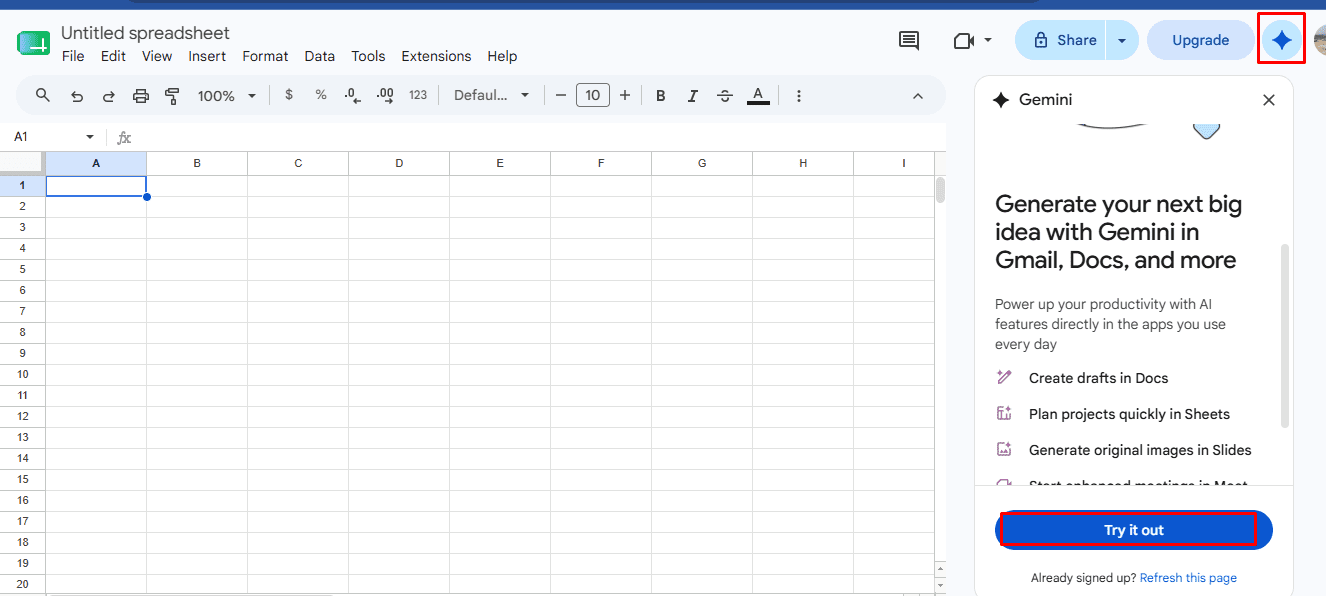
// Step 1: Accessing Gemini in Google Sheets
- Open a spreadsheet in Google Sheets
- Click the Ask Gemini button (sparkle icon) in the top-right corner
- A side panel will open on the right side of your screen
- Use the suggested prompts or type your own
// Step 2: Prompting Gemini to Create Sheets
Instead of typing out columns manually, ask Gemini to do it.
Prompt Examples:
- "Create a table to track monthly expenses with columns for Date, Category, Amount, Description, and Notes."
- "Build a project tracker with Task, Assignee, Deadline, Status, and Progress %."
- "Create a 10-day travel itinerary for Thailand, including daily activities, costs, and accommodations."
// Step 3: Reviewing and Inserting the Output
After you submit your prompt, Gemini will generate a structured table and display a preview in the side panel. Review it to check whether the columns, headers, and any sample data match what you had in mind.
- Click Insert once Gemini generates the preview to populate your sheet instantly
Gemini can generate a new sheet or insert a table into your current sheet. Review the output, then insert it or refine it with follow-up prompts.
// Step 4: Asking for Formulas and Analysis
You don't need to memorize complex formula syntax. You can ask Gemini to write the formulas for you.
Describe what you need in simple English:
- "Calculate the total revenue in column C based on quantity in A and price in B."
- "Create a formula for a running total in column D."
- "Find the average sales per month and highlight top performers."
Gemini provides the formula, explains it, and often suggests improvements. Insert it directly into your cells.
Pro Tip: Use the in-cell @ menu or "Help me organize" for quick assistance.
Method 2: Creating Sheets via the Gemini Web App
If you are using the free or standalone version of Gemini, you can generate data tables and sheets and export them directly to Google Sheets with a single click.
// Step 1: Prompting Gemini to Generate Structured Data
- Go to the Gemini web app
- Ask it to create a structured table
- To get the best results, specify the columns and data type
Prompt Example:
Create a monthly expense tracker table for personal budgeting. Include columns for Date, Category, Description, Payment Method, Amount, Budget, Difference, and Status. Add a few sample rows.
// Step 2: Exporting to Google Sheets
Once Gemini generates the table in its response:
- Scroll to the bottom of the generated table
- Click the table or click Open
- Gemini will automatically create a brand-new Google Sheet in your Google Drive and populate it with the data
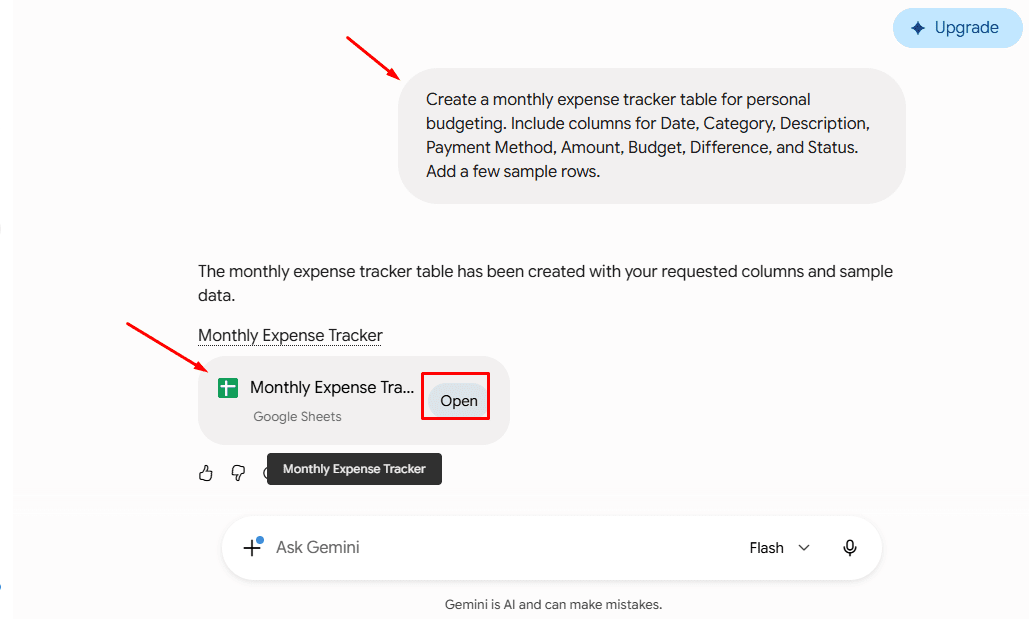
// Step 3: Opening in the Spreadsheet
Now you can format your spreadsheet.

Method 3: Generating Apps Script with Gemini (For Advanced Automation)
If you need a highly customized spreadsheet with specific formatting, automated tabs, or advanced logic, you can ask Gemini to write a Google Apps Script.
// Step 1: Requesting the Script
Prompt Example:
Write a Google Apps Script that creates a new sheet called 'Invoice Generator', sets the header row to blue with white text, and bolds the font.

// Step 2: Pasting It into Sheets
- Open your Google Sheet
- Go to the Extensions menu > Apps Script
- Delete any default code in the editor and paste the code provided by Gemini
- Click the Save (Disk) icon and then click Run (you may need to grant permissions the first time)
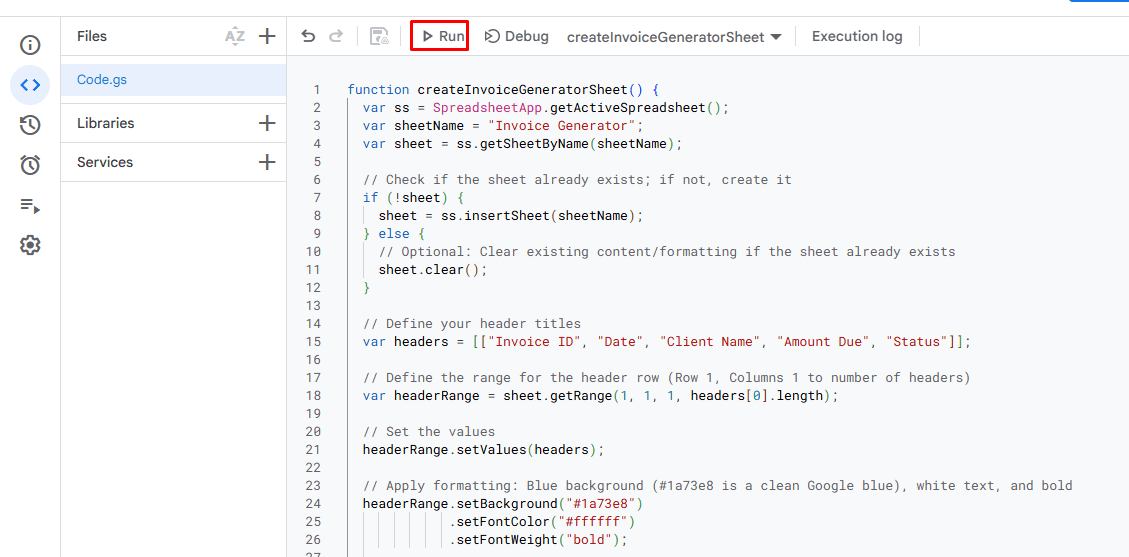
// Step 3: Viewing the Result
A sheet is created automatically. Now you can tweak the code with follow-up prompts.

Pro-Tips for Better Results
- Be Specific with Formatting: If you want currency, percentages, or dates formatted a certain way, explicitly tell Gemini (e.g. "Format the 'Price' column as USD currency").
- Use "Act As" Prompts: Tell Gemini its role to get better structured tables. For example: "Act as an expert data analyst. Generate a data cleanup checklist table..."
- Clean Up Data: You can paste messy, unorganized text into Gemini and ask: "Clean this data up and organize it into a table suitable for Google Sheets." Then use the export button.
Conclusion
You can use Gemini to create Google Sheets. Gemini transforms Sheets from a manual tool into an intelligent assistant, dramatically reducing the time required to set up a spreadsheet. Instead of manually building tables, formulas, and datasets, you can describe your requirements in plain language and let Gemini generate the foundation for your spreadsheet. Whether you're managing budgets, tracking sales, organizing projects, or building dashboards, Gemini helps transform ideas into functional Google Sheets much faster.
Shamima Sultana works as a Project Manager at ExcelDemy, where she does research on Microsoft Excel and writes articles related to her work. Shamima holds a BSc in Computer Science and Engineering and has a great interest in research and development. Shamima loves to learn new things, and is trying to provide enriched quality content regarding Excel, while always trying to gather knowledge from various sources and making innovative solutions.
 Instagram Engineering
 Shopify Engineering