
MiniMax M2 is now available on Ollama’s cloud. It’s a model built for coding and agentic workflows.
Get Started
ollama run minimax-m2:cloud
Highlights
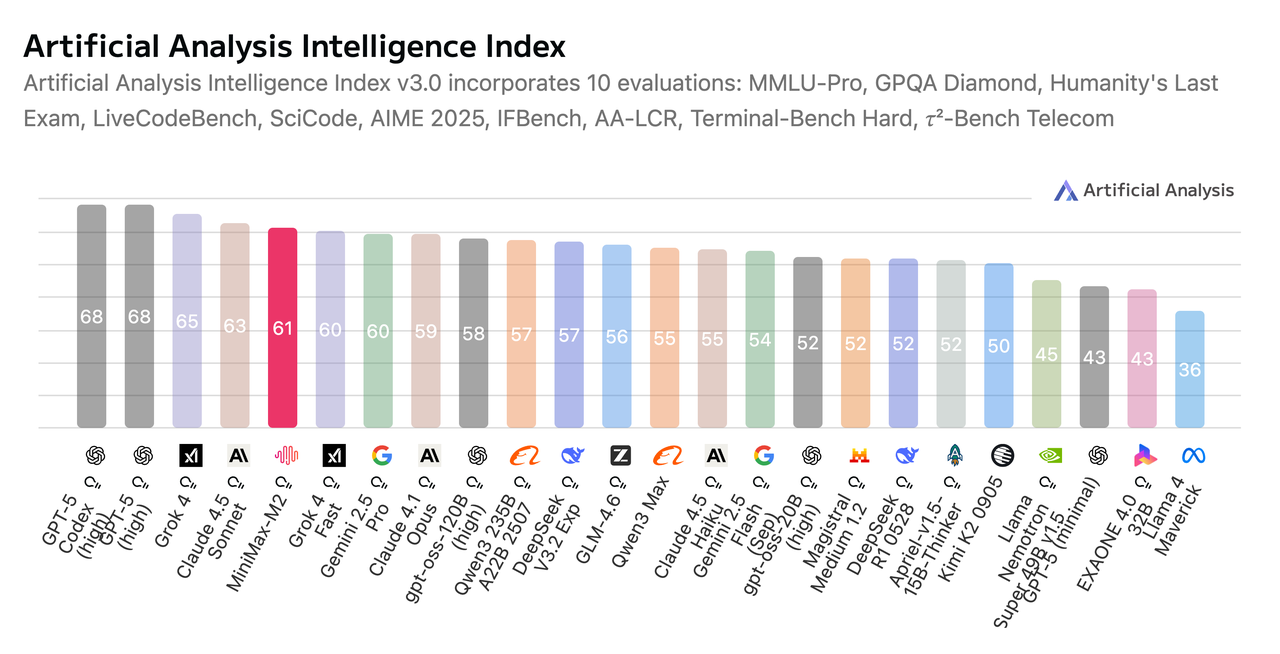
Superior Intelligence. According to benchmarks from Artificial Analysis, MiniMax-M2 demonstrates highly competitive general intelligence across mathematics, science, instruction following, coding, and agentic tool use. Its composite score ranks #1 among open-source models globally.
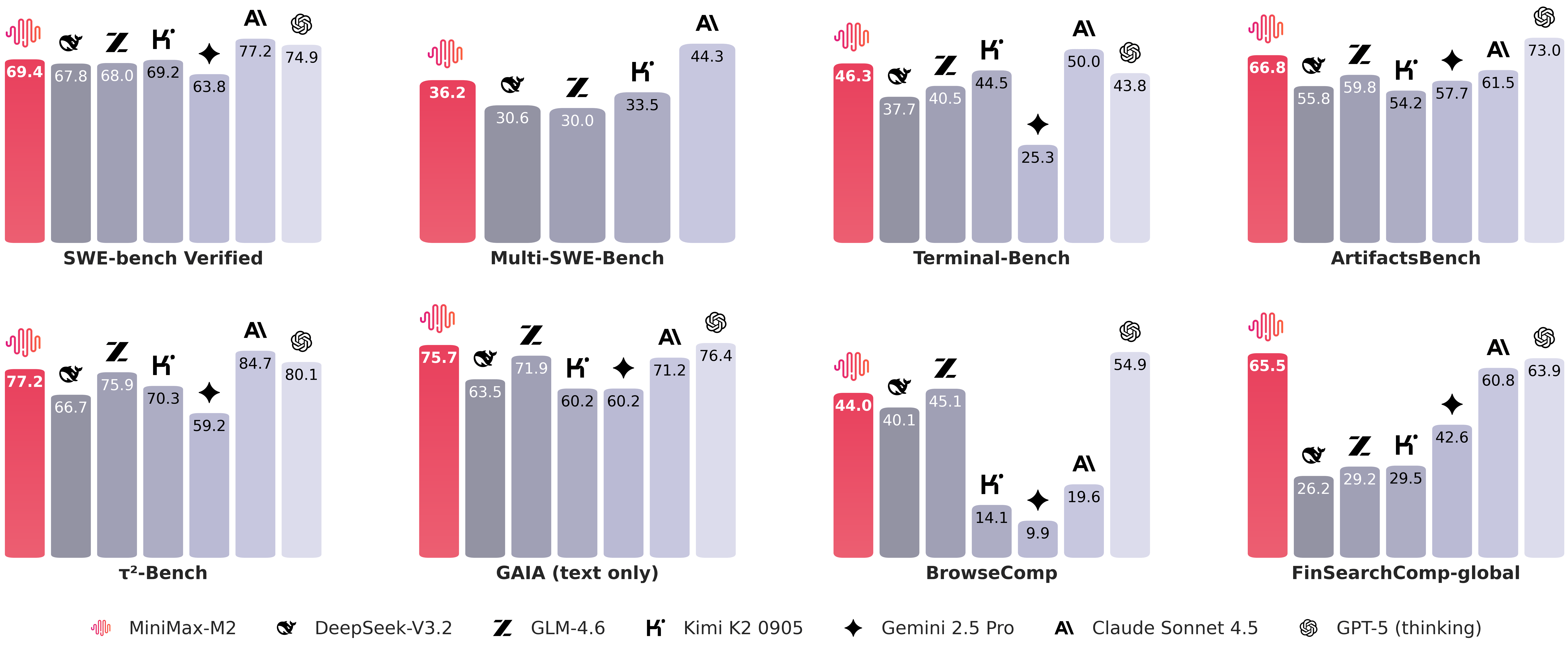
Advanced Coding. Engineered for end-to-end developer workflows, MiniMax-M2 excels at multi-file edits, coding-run-fix loops, and test-validated repairs. Strong performance on Terminal-Bench and (Multi-)SWE-Bench–style tasks demonstrates practical effectiveness in terminals, IDEs, and CI across languages.
Agent Performance. MiniMax-M2 plans and executes complex, long-horizon toolchains across shell, browser, retrieval, and code runners. In BrowseComp-style evaluations, it consistently locates hard-to-surface sources, maintains traceable evidence, and gracefully recovers from flaky steps.
Efficient Design. With 10 billion activated parameters (230 billion in total), MiniMax-M2 delivers lower latency, lower cost, and higher throughput for interactive agents and batched sampling—perfectly aligned with the shift toward highly deployable models that still shine on coding and agentic tasks.
Benchmarks
MiniMax M2 comparison with several other mainstream models
Artificial Analysis intelligence index
Usage with VS Code
First, pull the coding models so they can be accessed via VS Code:
ollama pull minimax-m2:cloud
- Open the copilot chat sidebar
- Select the model dropdown → Manage models
- Click on Ollama under Provider Dropdown, then select desired models
- Select the model dropdown → and choose the model (e.g.
minimax-m2:cloud)
Usage with Zed
First pull the coding models so they can be accessed via Zed:
ollama pull minimax-m2:cloud
Then, open Zed (now available for Windows!)
- Click on the agent panel button (glittering stars)
- Click on the model dropdown → Configure
- Select LLM providers → Ollama
- Confirm the Host URL is
http://localhost:11434, then click Connect
- Select a model under Ollama
Usage with Droid
First, install Droid:
curl -fsSL https://app.factory.ai/cli | sh
Add the following configuration to ~/.factory/config.json:
{
  "custom_models": [
    {
      "model_display_name": "MiniMax-M2",
      "model": "minimax-m2:cloud",
      "base_url": "http://localhost:11434/v1",
      "api_key": "not-needed",
      "provider": "generic-chat-completion-api",
      "max_tokens": 16384
    }
  ]
}
Then run Droid and type /model to change to the model:
╭──────────────────────────────────────────────────╮
│ > MiniMax-M2 [current]                              │
│   Qwen3-Coder-480B                               │
│                                                  │
│ ↑/↓ to navigate, Enter to select, ESC to go back │
╰──────────────────────────────────────────────────╯
Integrations
Ollama’s documentation now includes sections on using Ollama with popular coding tools:
Cloud API access
Cloud models such as minimax-m2:cloud can also be accessed directly via ollama.com’s cloud API:
First, create an API key, and set it in your environment
export OLLAMA_API_KEY="your_api_key_here"
Then, call ollama.com’s API
curl https://ollama.com/api/chat \
    -H "Authorization: Bearer $OLLAMA_API_KEY" \
    -d '{
    "model": "minimax-m2",
    "messages": [{
      "role": "user",
      "content": "Write a snake game in HTML."
    }]
}'
For more information see the Ollama’s API documentation.
 Instagram Engineering
 Shopify Engineering