Skip to content
While there are cheap handheld testers that can tell you if an Ethernet jack is wired improperly or if the cable itself has a broken conductor, figuring out if there’s a live TCP/IP network over it is a little more difficult. There are commercial testers that can detect those sorts of issues as well, but they’re considerably more expensive. So when trying to diagnose a flaky network connection, it’s often necessary to lug a laptop around so you can plug it in at various points to try and isolate the problem.
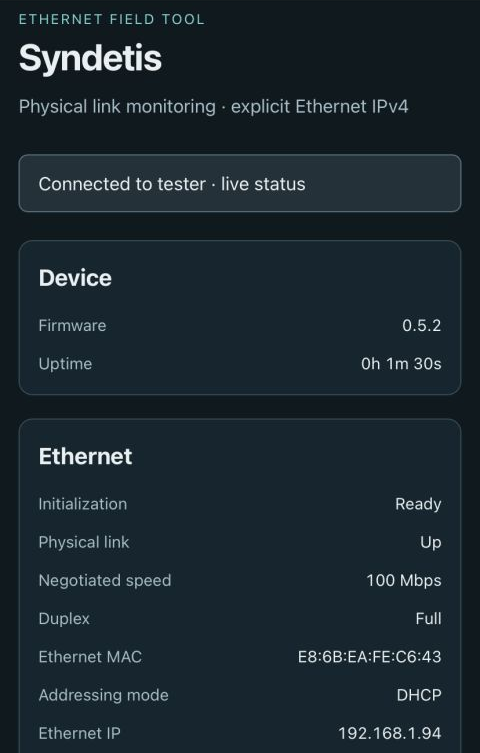
Mobile view of the web UI.
If this is a situation you occasionally find yourself in, the Syndetis project by [theo79] may be of interest. This firmware for the WT32-ETH01 turns the ESP32 development board into a handy network tester that can determine Ethernet link status, pin IP addresses, detect other devices using Link Layer Discovery Protocol (LLDP), and even and sniff out active services such as DHCP. Add an 128×64 OLED display, a few buttons, and a USB power bank, and you’ve got a self-contained diagnostic tool that can fit in your pocket.
Anyone who’s had to squeeze into a wiring closet will appreciate the stand-alone nature of this device. But if you’ve got the room to bring your phone along and a free hand to operate it, the firmware also offers up a web interface that can be accessed over WiFi.
This will present you with a slightly more polished UI than can be offered up by the OLED and buttons, offering up a more complete view of what’s happening on the network. It’s also possible to generate diagnostic reports that are saved as JSON files for later analysis.
If you don’t need all these fancy features and just want a quick way to tell if an Ethernet cable is good, we’ve covered a DIY tester that uses the venerable 555 timer. If you’ve got a multimeter handy, you can get away with little more than a bare PCB.
 Instagram Engineering
 Shopify Engineering